Stop supply-chain
attacks before they run
Drop-in npm install replacement that sandboxes every postinstall script,
statically analyzes for threats, and shares alerts across a decentralized threat intelligence network.
Try It Yourself
A live terminal running safenpm's actual algorithms in your browser. Type any command or click a quick demo below.
Sandbox Enforcement
Every postinstall script runs inside an OS-level sandbox with no network access. Malicious packages can't phone home, exfiltrate tokens, or download payloads.
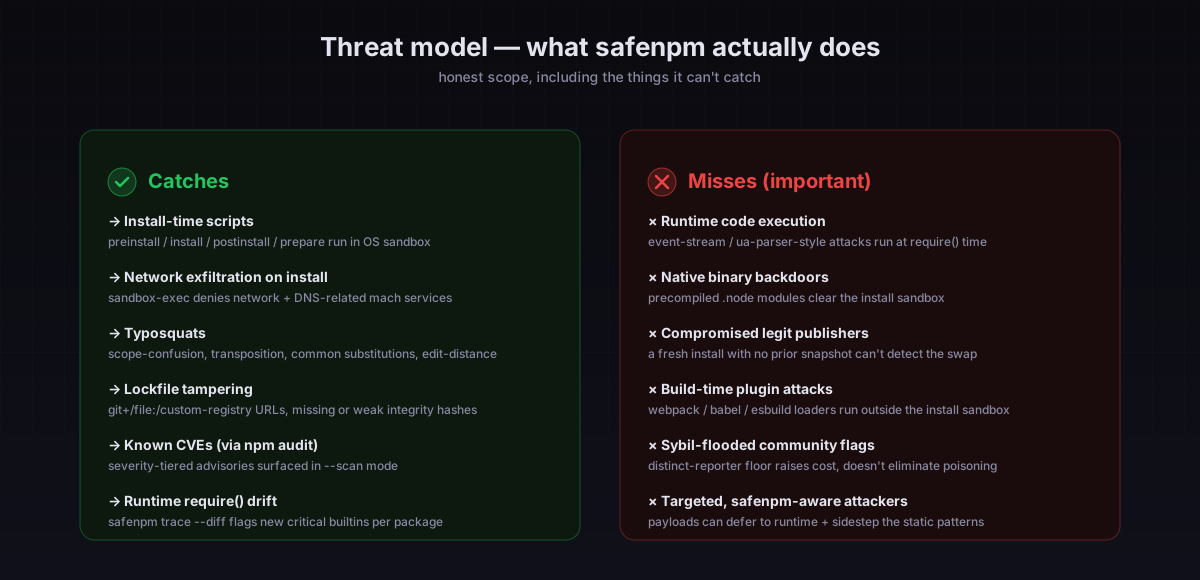
Caveat: macOS / Linux only; Windows is experimental. Doesn't protect against payloads that defer execution to require() time (use safenpm run --enforce-runtime).
Static Analysis
30+ detection rules scan every install script in the dep tree (nested up to 8 levels). Catches curl/wget, DNS/WebSocket/HTTP2/TLS requires, vm + process.binding, dynamic require()/import(), Buffer-from-hex, env exfil, SSH access — severity-weighted.
Caveat: patterns can be evaded by an attacker who knows them. Deliberate obfuscation that hides intent until runtime won't trip the static layer.
Typosquat Detection
Levenshtein distance plus 5 attack-pattern detectors (char-swap, substitution, scope confusion) check every dependency against 80+ popular npm packages.
Caveat: popular-package list is hand-curated; novel typosquats against less-popular packages aren't caught. False-positive friction can be silenced via !pkg-name in .safenpmrc.
Behavioral Diffing
Caches install scripts per project. On upgrade, compares against the cached version to surface new threats, new warnings, and risk-score changes.
Caveat: first install of a package has no baseline to compare against. The first time a hijacked legit package lands, this layer can't help.
Maintainer Change Detection
Queries the npm registry for publisher history. Alerts you when the person publishing a package changes between versions — a signal of account takeover.
Caveat: npm registry response is the only source of truth; if the registry itself is compromised, this signal is too.
Lockfile Integrity Audit
Parses package-lock.json to catch git dependencies, custom registries, missing integrity hashes, weak algorithms, and stale lockfiles.
Caveat: doesn't yet re-verify each tarball's hash against the live npm registry. An attacker who poisons both the tarball and the lockfile clears this check (planned for 0.6).
Reputation Scoring
Scores every package 0-100 based on maintainer count, license, repository presence, dependency weight, and maturity. Aggregates into a project health grade.
Caveat: offline heuristic over package.json metadata. Real CVE data comes from the npm audit integration, not this score.
Decentralized Threat Network
When a package is blocked, the signal is anonymously reported to the safenpm network. Every install queries it back — if one developer gets hit, everyone is warned. No identifying data ever leaves your machine.
Caveat: adoption is near zero today, so flags are rare. Sybil-resistance is partial (machineId entropy + distinct-reporter set + threshold ≥5). Do not rely on community flagging as your only signal.
Runtime require() Tracer + Enforcer
safenpm trace --diff flags when a dep starts using child_process / https / net between versions (CI-gateable post-takeover detection). safenpm run --enforce-runtime blocks disallowed builtins per a .safenpm-policy.json deny-list.
Caveat: CJS only. ESM import resolution goes through a different mechanism (planned for 0.2).
CI/CD Ready
Full JSON output mode, non-zero exit codes on blocks, audit log with auto-rotation, and a standalone scan command for pipeline integration.
Caveat: pre-1.0 — JSON shape can change between minor versions. Pin to an exact version in your CI image.
Doctor Health Report
Single command gives your project a letter grade (A+ to F) with weighted scores across 6 categories. Every finding comes with an actionable fix suggestion.
Caveat: the grade is an opinion, not a security claim. Use the individual findings, not the letter.
One-Click Auto-Fix
Detected a typosquat? safenpm fix automatically removes the suspect and installs the legitimate package. Preview with --dry-run before applying.
Caveat: auto-acts on high/medium confidence findings only. Always review with --dry-run first.
Package Diff Viewer
Git-diff-style output showing exactly what changed in each dependency update — script modifications, added/removed deps, and new files. Snapshot and compare.
Caveat: requires a prior safenpm diff --snapshot to baseline. A clean-room install has nothing to compare against.
Full version at SECURITY.md · Runtime-isolation roadmap at docs/runtime-isolation.md
Every developer knows.
blocked by sandbox
sent to network
warned automatically
Fully Anonymous
Signals contain only the package name, script content hash, and block reason. No IP addresses, usernames, project names, or file paths are transmitted.
Real-Time Protection
Threat queries happen on every install with a local cache layer. New threats propagate across the network within minutes of the first detection.
Opt-Out Friendly
Run with --no-report to disable outbound signal reporting. Threat intel queries still work — you benefit from the network without contributing.
/api/v1/stats endpoint returns; no demo data.
Recent Signals
Attack Categories
| Platform | Backend | Network Block | FS Sandboxing | Requires |
|---|---|---|---|---|
| macOS | sandbox-exec |
Built-in | ||
| Linux | firejail |
apt install firejail |
||
| Windows (admin) | Firewall + ACLs | Run as Administrator | ||
| Windows (WSL) | firejail via WSL |
WSL + firejail |
Quick Start
Install safenpm globally and use it as a drop-in replacement for npm install.
Install
npm install -g @abgunaydin/safenpmBasic usage
# Instead of npm install:
safenpm install

# Install specific packages:
safenpm install axios lodash express

# Short form:
safenpm i
What happens
safenpm runs npm install --ignore-scripts first to install packages normally,
then discovers all postinstall/preinstall/install hooks and runs each one inside an OS-native sandbox.
If a script tries to access the network or read sensitive files, it gets blocked and reported.
Preview before running
safenpm i --dry-runCommand Line Options
| Flag | Short | Description |
|---|---|---|
| --dry-run | -n | Preview what would be sandboxed without executing |
| --allow <pkg,...> | Skip sandboxing for trusted packages | |
| --scan | -S | Enable deep scan (typosquat, diffing, intel, lockfile, reputation) |
| --json | Machine-readable JSON output for CI pipelines | |
| --interactive | -I | Prompt on each blocked package: retry / skip / abort |
| --loose | Network-only sandbox (no filesystem restrictions) | |
| --no-report | Disable anonymous signal reporting |
Commands
| Command | Description |
|---|---|
| install / i | Install packages with sandboxing |
| doctor | Health report card with letter grade and fixes |
| fix | Auto-fix typosquats and remove malicious packages |
| diff | Show what changed in dependencies since snapshot |
| scan | Standalone deep scan (no install) |
| audit | View recent safenpm run history |
Deep Scan
The --scan flag activates all six intelligence modules for a comprehensive
security audit of your dependency tree.
# During install:
safenpm install --scan

# Standalone (no install, analysis only):
safenpm scan

# JSON output for CI:
safenpm scan --json
What gets checked
Typosquat detection checks every package name against 80+ popular npm packages using Levenshtein distance and 5 attack pattern detectors including char-swap, substitution (0→o, rn→m), scope confusion, and edit distance analysis.
Behavioral diffing compares install scripts against a cached baseline from your last install. If a package upgrade introduces new curl calls, DNS lookups, or other suspicious patterns, you'll see the exact new warnings and risk delta.
Maintainer change detection queries the npm registry for the publisher of each version. If the account publishing the current version differs from who published the previous one, that's flagged as a potential account takeover.
Lockfile integrity audit parses package-lock.json and checks for git dependencies, custom registries, missing integrity hashes, weak hash algorithms, and stale lockfiles.
Reputation scoring evaluates every package based on maintainer count, license, repository presence, dependency weight, install scripts, and version maturity, producing a 0-100 score and a project-level health grade.
Community threat intel runs automatically on every install — not just with --scan.
Each time you run safenpm install, packages are checked against the live
decentralized intelligence network, surfacing flagged packages with report counts and attack categories
before any scripts execute.
Allowlisting
Some packages (like bcrypt, sharp, or node-gyp native modules) legitimately need install scripts. Allowlist them to skip sandboxing.
CLI flag
safenpm i --allow bcrypt,sharp,@img/sharp-darwin-arm64Project config (.safenpmrc)
# .safenpmrc in project root
bcrypt
sharp
@img/*
@mycompany/*
Global config
# ~/.safenpmrc
bcrypt
node-gyp
Allowlisted packages still run, but outside the sandbox. The allowlist is loaded from three sources
(CLI flags, project .safenpmrc, home ~/.safenpmrc)
and merged. Scope wildcards (@scope/*) match all packages in that scope.
CI/CD Integration
GitHub Actions
- name: Install with safenpm
  run: |
    npm install -g @abgunaydin/safenpm
    safenpm install --json --scan --no-report | tee safenpm-report.json

- name: Check for blocks
  run: |
    BLOCKED=$(cat safenpm-report.json | jq '.summary.blocked')
    TYPOS=$(cat safenpm-report.json | jq '.summary.typosquats')
    if [ "$BLOCKED" -gt 0 ] || [ "$TYPOS" -gt 0 ]; then
      echo "::error::safenpm found $BLOCKED blocked scripts and $TYPOS typosquat suspects"
      exit 1
    fi
JSON output structure
{
  "version": "0.1.0",
  "backend": "sandbox-exec (macOS)",
  "packages": [...],
  "typosquats": [...],
  "lockfileAudit": { "score": 85, "issues": [...] },
  "reputationSummary": { "overallScore": 72, ... },
  "summary": {
    "total": 5, "blocked": 1, "clean": 3,
    "allowed": 1, "warnings": 8,
    "typosquats": 0, "maintainerChanges": 0,
    "lockfileIssues": 2, "reputationScore": 72
  }
}
Doctor as CI gate
# Fail the build if project health is D or F:
safenpm doctor --json
# (exits non-zero on score < 60)
Standalone scan (no install)
# Just scan existing node_modules:
safenpm scan --json
Audit log
Every run is logged to ~/.safenpm/audit.log in JSONL format with auto-rotation
at 5MB. Query it with safenpm audit or safenpm audit --json.
Static Analysis Rules
safenpm's analyzer runs 19 rules across 3 severity tiers before scripts are sandboxed. Each rule has a weight; the total is capped at 100.
High severity (weight: 30)
curl/wget downloads, netcat, require('https'), fetch(), require('dns'), process.env access, ~/.ssh access, sensitive dotfile reads (.aws, .npmrc, .docker, .kube), eval(), base64 encoding/decoding, pipe-to-shell execution.
Medium severity (weight: 15)
/etc/passwd reads, $HOME access, child_process spawning, hex/unicode obfuscation, net/dgram socket creation.
Low severity (weight: 5)
node-gyp native builds, prebuild-install, node-pre-gyp. These are common in legitimate packages.
Risk levels
Scores map to levels: critical (60+), suspicious (30-59), low (1-29), clean (0).
Doctor — Project Health Report
safenpm doctor runs every analysis module and produces a letter grade
from A+ to F, with weighted scores across 6 categories.
# Run a health check:
safenpm doctor

# JSON output for CI gates:
safenpm doctor --json
What gets graded
Lockfile (20% weight) — checks for missing lockfile, git/file dependencies, missing integrity hashes, weak algorithms, and staleness.
Install Scripts (25% weight) — static analysis of all postinstall hooks. Critical-risk scripts heavily penalize the score.
Typosquats (20% weight) — scans every package name. A single high-confidence typosquat drops this section to 10/100.
Reputation (15% weight) — aggregate reputation score from all packages. Low-reputation packages (missing license, no repo, single maintainer) drag this down.
Behavior (10% weight) — compares install scripts against cached baselines. Significant risk increases are flagged.
Project Hygiene (10% weight) — checks for .safenpmrc, engines field, wildcard version ranges, and package.json health.
Grade scale
A+ (97+), A (93+), A- (90+), B+ (87+), B (83+), B- (80+), C+ (77+), C (73+), C- (70+), D (60+), F (below 60). Doctor exits non-zero on D or F for CI gating.
Actionable fixes
Every finding includes a fix: suggestion — specific commands to run,
config changes to make, or packages to replace. If auto-fixable issues are found, doctor
prompts you to run safenpm fix.
Auto-Fix
safenpm fix scans for fixable issues and applies corrections automatically.
# Preview what would be fixed:
safenpm fix --dry-run

# Apply all fixes:
safenpm fix

# JSON output:
safenpm fix --json
What gets fixed
Typosquat replacement — high and medium confidence typosquats are automatically
removed and replaced with the legitimate package. For example, axois
gets uninstalled and axios gets installed in its place.
Malicious package removal — packages that were blocked during
safenpm install (network or filesystem violations) can be
removed from node_modules and package.json in one step.
How it works
Fix uses npm uninstall to cleanly remove packages, then
npm install --ignore-scripts for replacements. If npm uninstall
fails (corrupted state), it falls back to manual cleanup: deleting the directory from
node_modules and stripping the entry from all dependency fields in package.json.
Package Diff Viewer
safenpm diff shows exactly what changed in your dependencies
since the last time you took a snapshot — like git diff for your node_modules.
# Save current state as baseline:
safenpm diff --snapshot

# After updating packages, see what changed:
npm update
safenpm diff

# JSON output:
safenpm diff --json
What gets compared
Install script changes — line-level diffs of postinstall/preinstall hooks with red/green coloring. Shows when scripts are added, removed, or modified between versions.
Dependency changes — new dependencies added, old ones removed, and version range changes within each package.
File changes — new files added or removed from the package directory. Catches when a package ships unexpected new binaries or scripts.
Workflow
Run safenpm diff --snapshot after a clean install to establish
your baseline. Then after any npm update or version bump, run
safenpm diff to review changes before deploying. Integrate into
CI by checking the JSON output for unexpected script modifications.
Secure your installs today
One command. Zero configuration. Full protection.
npm install -g @abgunaydin/safenpm See what safenpm catches →